Optimus.
The procurement-and-margin engine for fuel networks.
Optimus turns fuel buying from a decision made on experience and availability into one made on data. Each morning it pulls live ERP data — current stocks, in-transit orders, station-level sales, supplier offers — forecasts when each station × fuel-type position will run critical, flags inbound delivery conflicts where arriving volume exceeds tank capacity, and produces concrete procurement recommendations: which supplier, how many tons, by what date, at what price.
The user is the head of supply. The morning workflow is 10 to 15 minutes: read the briefing, close the critical positions, confirm or adjust the recommendations, issue the purchase orders. Optimus is in pilot at Red Petroleum — an independent fuel network in Kyrgyzstan, around 250 stations. It is one embodiment of how we work in fuel: the procurement-and-margin engine, on connected data — the wider network economy is on the fuel-retail page.
Procurement, scored every morning.
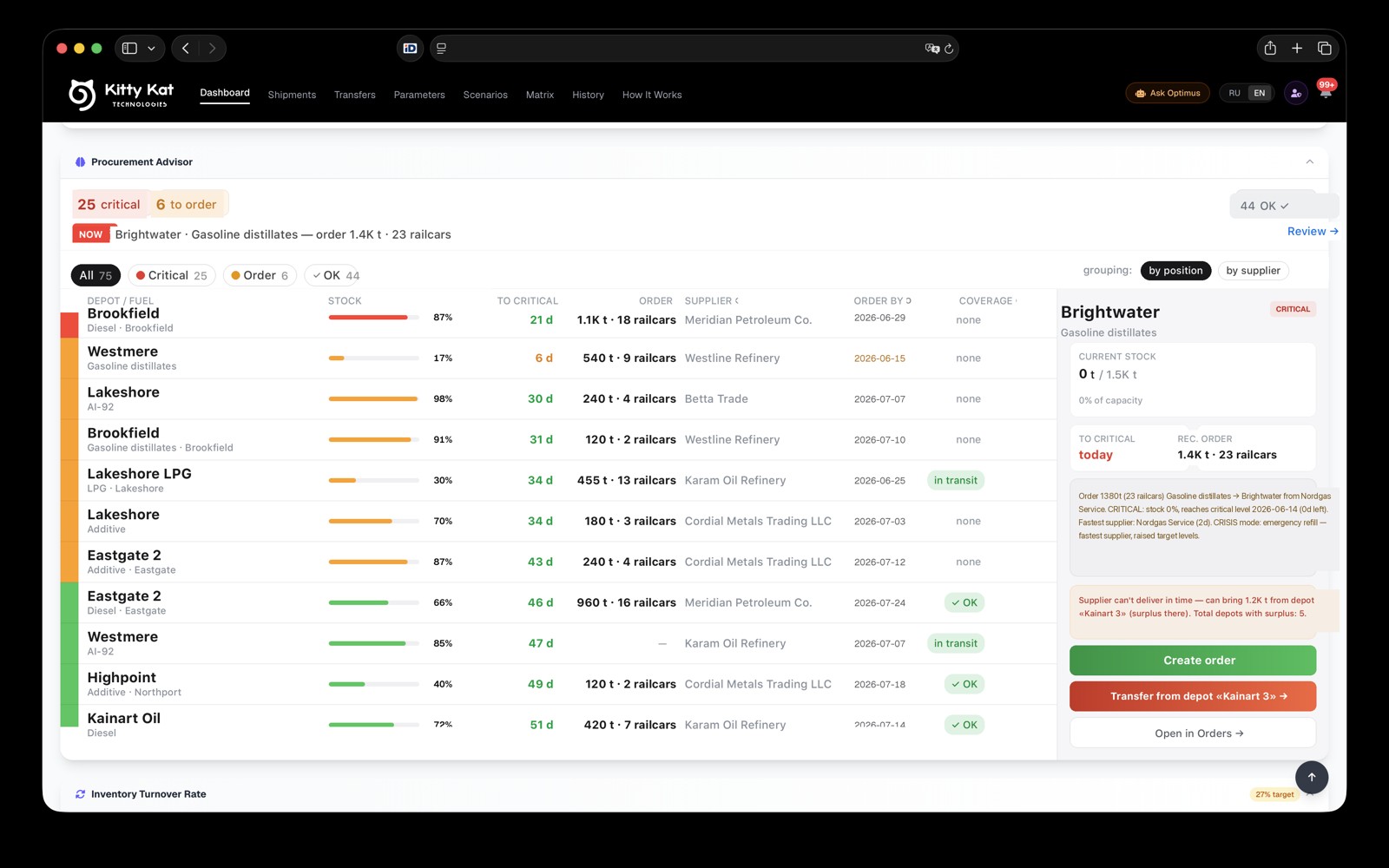
The Procurement Advisor ranks every position by urgency — critical, needs ordering, or covered — with the recommended tonnage, the best supplier, and the order-by date already worked out. The operator reviews; it does the maths.
Ten to fifteen minutes, then the day starts.
- 18:00 AM — Open the briefing.
The head of supply opens Optimus and sees yesterday's pipeline freshness in one glance, not 40 minutes of reconciliation. Action Required. Good News. Savings Tip. What changed since yesterday.
- 2Close critical positions.
Procurement Advisor surfaces every station × fuel that will hit critical level inside the planning window. Each row already has a recommended supplier, tonnage, and deadline. Confirm or override.
- 3Resolve delivery conflicts.
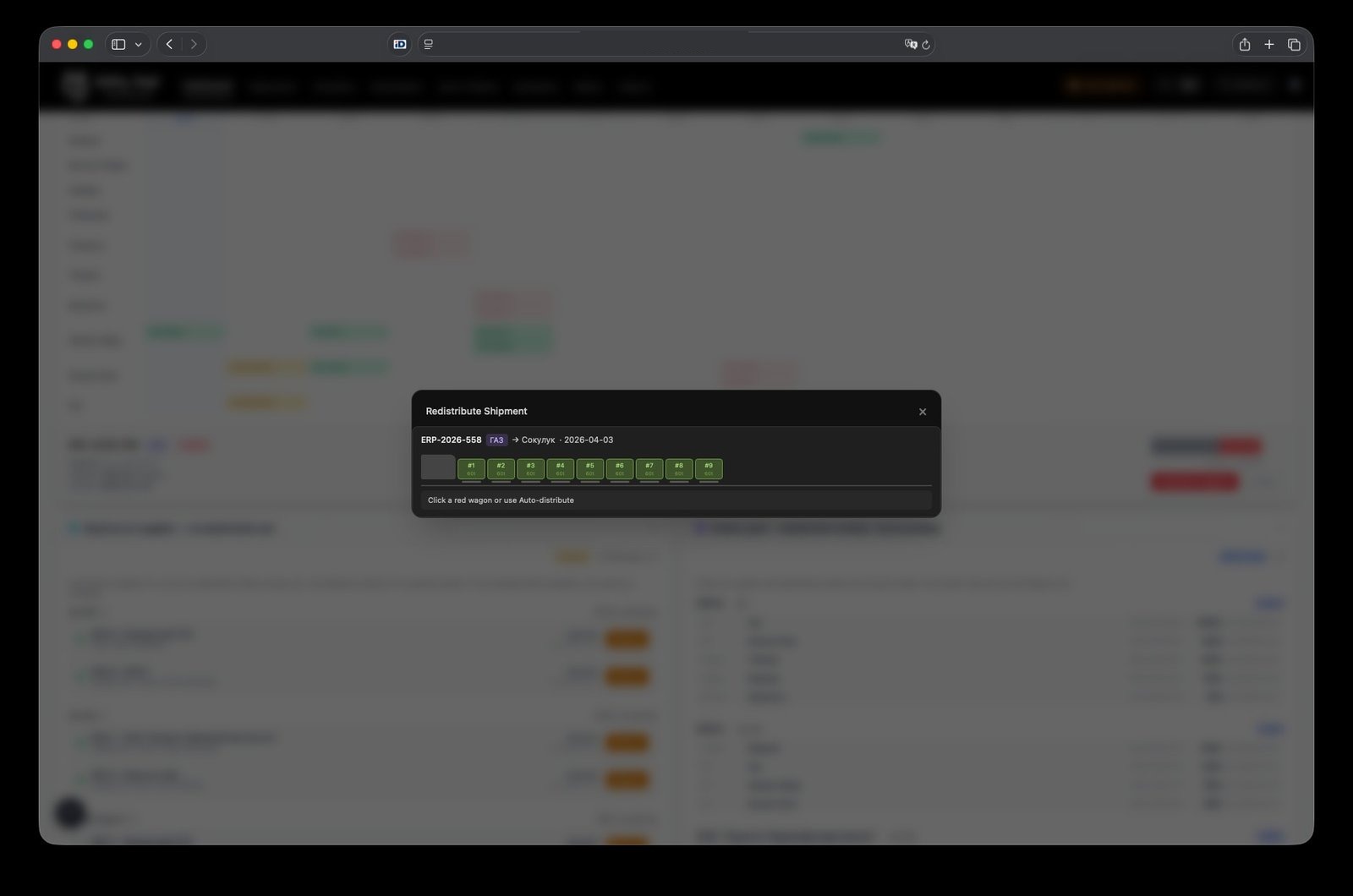
When inbound volume exceeds available tank capacity, Auto-Distribute reroutes overflow to the nearest stations with free capacity. The operator sees the proposed routing, not just an alert.
- 4Issue the POs.
One-click PO creation on confirmed recommendations. The Reserves Panel covers any fuel already held at supplier without destination — assign it to a station with capacity check.
- 5Walk away.
Critical alerts mirror to a Telegram group. The operator does not depend on the web interface for the rest of the day.
What it changes.
Fewer surprise critical positions. The forecast surfaces them days before they happen, when there is still time to act.
$ frozen in inventory becomes visible per fuel and per region — and so does where to release it. Inventory turnover stops being a quarterly review and becomes a daily decision.
Decisions that took half a day of reconciliation move to minutes. The operator sees the recommendation and the data behind it on the same screen.
Recommendation history makes supplier-by-supplier savings visible over time. The Procurement Advisor's defaults shift with what the data shows.
Numbers per deployment vary by network size, fuel mix, and baseline. We publish ranges from real deployments. See the Red Petroleum case for one deployment's actual movement.
The full functional surface, in four clusters.
Fourteen capabilities, organised by how the operator actually meets them — what you see, what you act on, what you track over time, and what runs without you.
What you see on day one.
- AI Briefing
Plain-language daily summary — Action Required, Good News, Savings Tip. Free-form chat answers questions from live data.
- Stockout Forecast
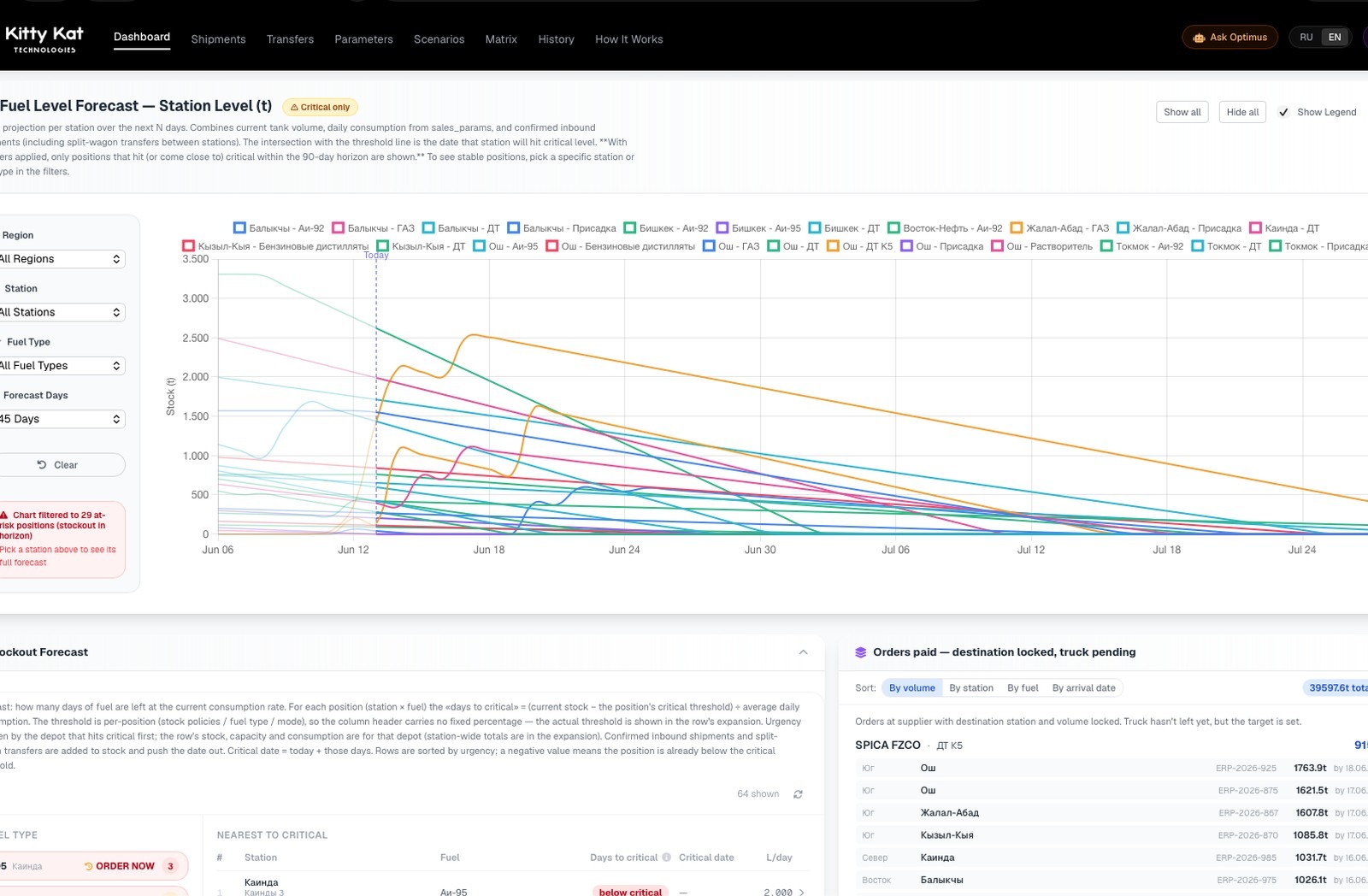
Days remaining until critical level per station × fuel. Includes in-transit and split-wagon transfers.
- Fuel Level Forecast
Per-station stock projection charts with region and fuel filters.
- Station Fill Levels
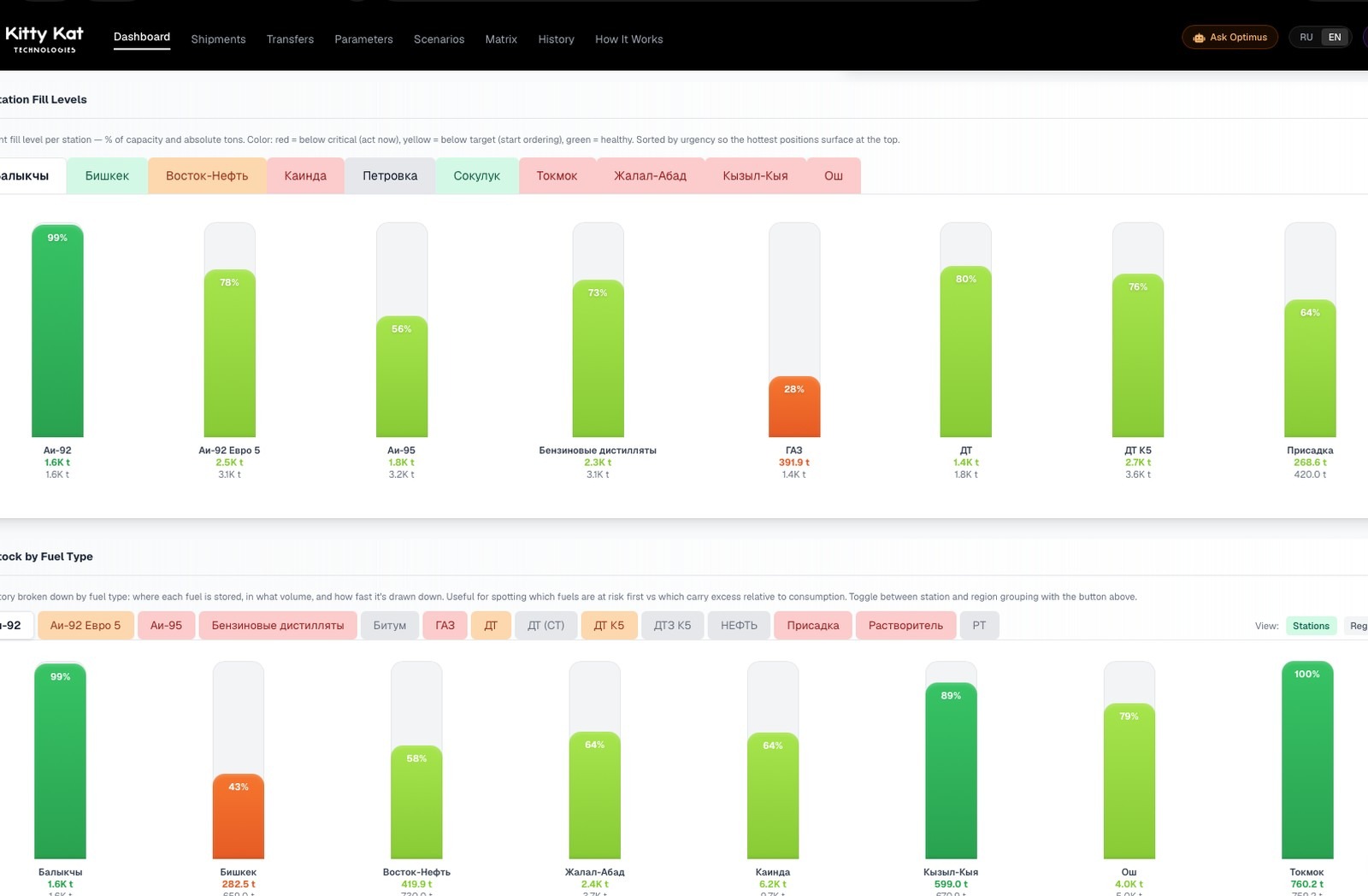
Per-station, per-fuel % capacity and tonnage, sorted by urgency.
What you act on.
- Procurement Advisor
Concrete order recommendations with supplier, tonnage, deadline, price. Statuses CRITICAL / ORDER / OK. One-click PO creation.
- Reserves Panel
Fuel held at supplier without destination. Release reserve assigns to a specific station with capacity check.
- Delivery conflict resolver
Auto-Distribute reroutes overflow wagons to nearest stations with free capacity. Audit trail.
- Forced Order flow
Senior management override path with audit trail and ship-history fallback.
What you track over time.
- Working Capital
$ frozen in inventory and where to release.
- Inventory Turnover
Per-fuel turnover rate, days on hand, value at stake.
- Recommendation History
Daily snapshots — rewind to any past day to see what was advised and what happened.
- Shipments Timeline
14 / 30 / 60-day forward view per station. Color-coded OK / Tight / Conflict.
What runs without you.
- Auto-import (cron, ~03:30 local)
Pulls fresh stocks and orders from ERP. No manual upload.
- Telegram alert mirror
Critical events pushed to operator group regardless of web availability.
What it actually looks like.
Four operator surfaces, lifted from a live deployment. At this display size the structure and density are visible but individual numbers are not — the way it should be.
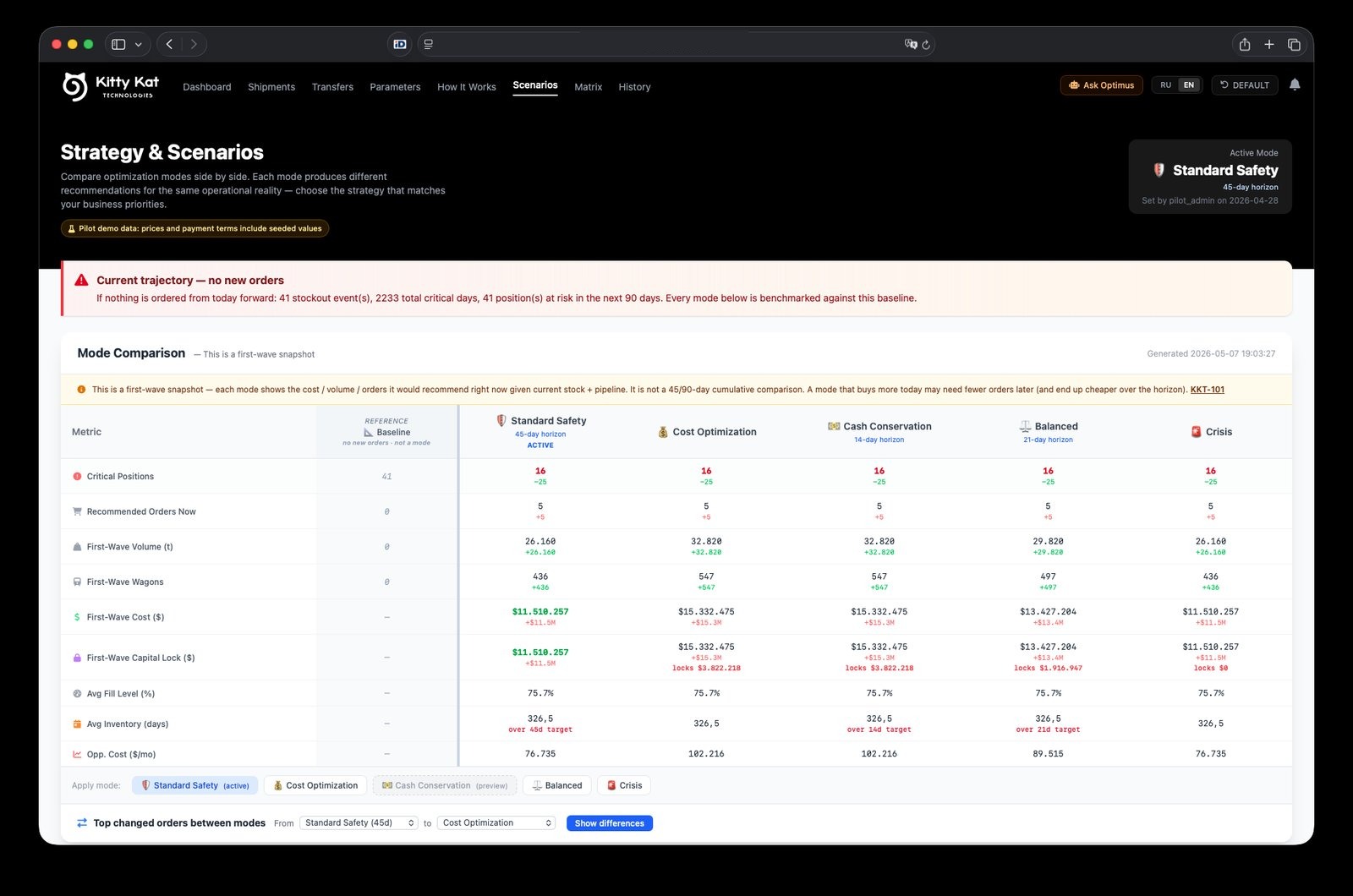
Five operating modes, one engine.
Optimus runs the same forecast engine in five postures — pick the one that matches the moment. The procurement recommendations, working-capital pressure, and inventory posture re-balance accordingly. CFO-grade comparison built into the operator surface.
Default. Conservative buffers, 45-day horizon, low surprise risk.
Push for cheapest landed price across the network. Tighter buffers, more sensitivity to supplier price shifts.
Minimise capital lock. Lower inventory days, smaller PO sizes, accept slightly tighter operating margin.
Median posture between cost, cash, and risk. Useful default when conditions are stable.
Hold-the-line mode. Survive the immediate window, defer everything that can be deferred.
Each mode produces a different recommendation set against the same operational reality — visible side-by-side. Mode comparison view in the screenshot above.
In pilot at Red Petroleum.
An independent fuel network piloting Optimus for procurement and margin — buying on connected data instead of experience and availability.
Read the case →Numbers per deployment vary by network size, fuel mix, and baseline. We publish ranges from real deployments.
See if Optimus fits your network.
A two-week diagnostic looks at your pricing posture, margin posture, and station-level operations — and tells you what shipping Optimus into your network would actually look like.